Amazon ACoS vs TACoS: Which Number Should You Actually Watch?
Key Takeaways
- ACoS shows how much you spend on ads compared to the sales those ads bring in.
- TACoS shows how much you spend on ads compared to your total sales, including organic sales.
- ACoS helps you judge single campaigns. TACoS helps you judge the health of your whole business.
- A falling TACoS while sales grow is often a sign that your ads are building organic ranking.
- The best sellers watch both numbers together, not just one.
On This Page
- Why These Two Numbers Confuse So Many Sellers
- What Is ACoS?
- What Is TACoS?
- ACoS vs TACoS at a Glance
- A Simple Example
- Which Number Should You Trust?
- How to Improve Both Numbers
- Common Mistakes to Avoid
- Conclusion
- Frequently Asked Questions
Why These Two Numbers Confuse So Many Sellers
Open any Amazon advertising report and you will see a lot of short words and percentages. Two of the most talked about are ACoS and TACoS. They sound almost the same, and many sellers use them as if they mean the same thing.
They do not. One number tells you if a campaign is working. The other tells you if your business is healthy. If you only look at one, you can make wrong choices, like turning off ads that are quietly helping your organic sales.
Let us make this simple.
What Is ACoS?
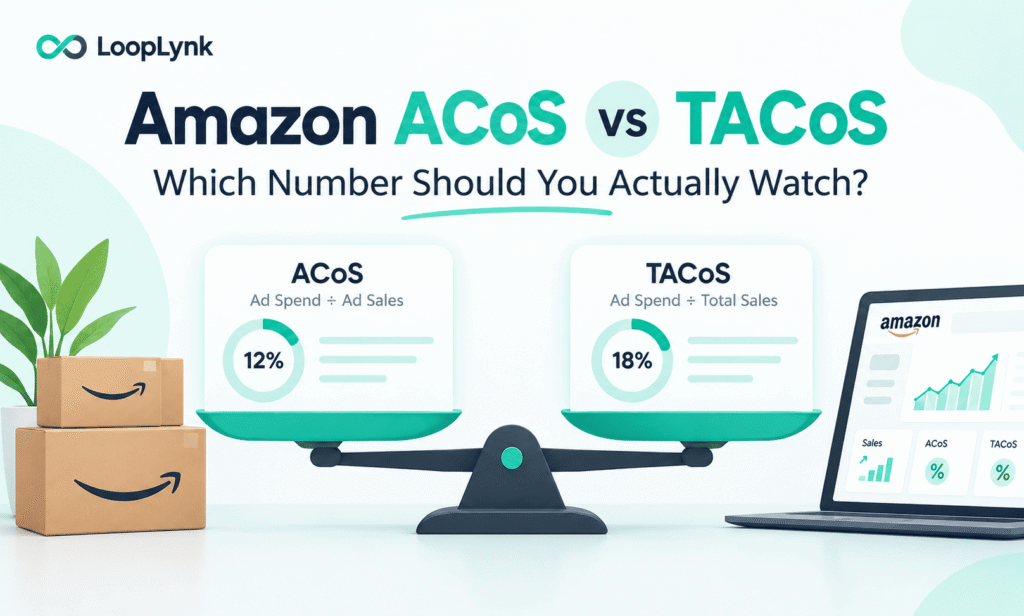
ACoS stands for Advertising Cost of Sales. It tells you how much you spent on ads to earn each dollar of ad sales.
Formula: Ad Spend divided by Ad Sales, times 100
If you spend $100 on ads and those ads bring $400 in sales, your ACoS is 25%.
A lower ACoS usually means your ads are more efficient. But lower is not always better. A very low ACoS can mean you are only bidding on a few safe keywords and missing chances to grow. Good Amazon PPC management services balance efficiency with growth.
What Is TACoS?
TACoS stands for Total Advertising Cost of Sales. Instead of comparing your ad spend to ad sales only, it compares your ad spend to your total sales. That includes sales that came from ads and sales that came from organic search, without any ad click.
Formula: Ad Spend divided by Total Sales, times 100
If you spend $100 on ads and your total sales for the month are $1,000, your TACoS is 10%.
This number matters because good advertising does more than sell products directly. It brings more shoppers to your listing, helps your product rank higher, and lifts organic sales too. TACoS is the number that shows that bigger picture.
ACoS vs TACoS at a Glance
| ACoS | TACoS | |
|---|---|---|
| What it compares | Ad spend to ad sales | Ad spend to total sales |
| What it tells you | How efficient your ads are | How dependent your business is on ads |
| Best used for | Judging campaigns and keywords | Judging overall business health |
| Includes organic sales | No | Yes |
| Good sign | Stable or improving over time | Falling while total sales grow |
A Simple Example
Say you sell a water bottle on Amazon. Here is your month:
- Ad spend: $2,000
- Sales from ads: $8,000
- Total sales (ads plus organic): $20,000
Your ACoS is $2,000 divided by $8,000, which is 25%.
Your TACoS is $2,000 divided by $20,000, which is 10%.
Now imagine next month you raise your ad spend to $2,500 and your total sales jump to $32,000. Your TACoS drops to about 7.8%, even though you spent more on ads.
Why? Because your ads pushed more shoppers to your listing, your ranking improved, and organic sales grew. If you had only looked at ACoS, you might have thought you were spending too much. TACoS tells you the ads are doing their job.
Which Number Should You Trust?
Both, for different jobs.
Use ACoS when you are asking:
- Is this campaign making money?
- Which keywords should get more budget?
- Which keywords should I pause or bid lower on?
Use TACoS when you are asking:
- Is my business growing in a healthy way?
- Am I too dependent on paid traffic?
- Are my ads helping my organic ranking?
A healthy pattern usually looks like this: ACoS stays under control, total sales go up, and TACoS slowly goes down. That means your business is standing on its own feet more and more.
How to Improve Both Numbers
1. Fix your listing first. Ads send shoppers to your page. If your title, images, and bullets do not convince them, you pay for clicks that never turn into orders. Strong Amazon listing optimization improves your conversion rate, which lowers ACoS right away.
2. Add A+ Content. Rich images and clear comparison charts help shoppers trust your product. See our guide on Amazon A+ Content to get started.
3. Clean up wasted spend. Add negative keywords to stop ads showing for searches that will never buy. This is one of the fastest ways to lower ACoS.
4. Build organic rank with smart bidding. Focus ad budget on the keywords that matter most for your product. When ranking improves, organic sales rise and TACoS falls.
5. Keep stock healthy. Running out of stock hurts your rank and wastes ad momentum. Good Amazon account management includes inventory planning so this does not happen.
Common Mistakes to Avoid
- Chasing a very low ACoS. You may be limiting your growth by playing too safe.
- Ignoring TACoS. You might cut ads that are quietly driving organic sales.
- Judging a launch too early. New products often start with a high ACoS and high TACoS. That is normal while you build reviews and rank.
- Comparing to other sellers. A good number depends on your margins, category, and goals. Know your break even point first.
Conclusion
ACoS and TACoS are not rivals. They are two tools that answer two different questions. ACoS tells you if your ads are efficient. TACoS tells you if your business is getting stronger. When you read them together, you can spend with confidence, cut waste, and grow at a steady pace.
If you are not sure what your numbers are really saying, the Looplynk team can help. We look at your ads, listings, and account as one system, so every decision supports your growth.
Want to see what your numbers are hiding? Book a Free Account Review
Frequently Asked Questions
1. What does ACoS stand for?
ACoS stands for Advertising Cost of Sales. It shows how much you spend on ads for every dollar of sales those ads generate.
2. What does TACoS stand for?
TACoS stands for Total Advertising Cost of Sales. It compares your ad spend to your total sales, including organic sales.
3. What is a good ACoS on Amazon?
It depends on your profit margin. A good ACoS is one that stays below your break even point while still allowing you to grow. Launch phases often run higher.
4. What is a good TACoS?
There is no single perfect number. What matters most is the direction. A TACoS that falls over time while total sales rise is a healthy sign.
5. Can my TACoS go down if I spend more on ads?
Yes. If extra ad spend lifts your ranking and organic sales, your total sales can grow faster than your ad spend, which lowers TACoS.
6. Should I stop ads when my ACoS is high?
Not always. Check your TACoS and your organic sales first. Some ads support your ranking even when their own ACoS looks high.
7. Do Amazon agencies help with ACoS and TACoS?
Yes. A good agency audits your campaigns, removes wasted spend, improves listings, and tracks both numbers so you can see the full picture.