Amazon PPC Campaign Structure for2026 : The Exact Setup
Q4 is here. Amazon has confirmed that Prime Big Deal Days 2026 runs on October 6 and 7, and Black Friday and Cyber Monday follow a few weeks later. Every year the same thing happens. Sellers push more money into ads, clicks get more expensive, and the accounts with a messy structure lose the most.
The auction is also getting more crowded. Amazon’s advertising revenue reached $19.8 billion in the second quarter of 2026, up 26% from a year earlier, according to CNBC. More advertisers are bidding for the same shoppers. When clicks cost more, structure is what separates a profitable account from an expensive one.
At LoopLynk we audit Amazon PPC accounts every week as part of our Amazon PPC management service. The most common problem is not bad bids. It is an account built in a way that makes good decisions impossible. Ten products in one campaign. Broad, phrase and exact keywords mixed in one ad group. Auto campaigns that were never harvested. No naming system, so nobody knows what a campaign is for.
This guide shows the exact campaign structure we use in 2026. You will get a worked example with real numbers, a budget split, naming rules, and the weekly routine that keeps the account clean.
Why structure matters more than bids
A bid controls how much you pay for one click. Structure controls whether you can see which clicks deserve your money.
Here is a simple example. You have one campaign with a broad match keyword and an exact match keyword for the same term. The campaign shows 45% ACOS. Is that the broad keyword pulling in junk searches, or is the exact keyword also weak? You cannot tell from the campaign view, so most sellers lower every bid. The broad keyword gets a little better and the exact keyword, which was actually profitable, loses its top of search position. Sales drop and ACOS barely moves.
When every campaign has one job, one product and one targeting type, every number in your report means one thing. That is the whole idea behind the structure below.
Five rules before you build anything
1. One parent product per campaign. Variations of the same product (sizes, colors) can share a campaign. Two different products cannot. They have different prices, margins and keywords, so they need different bids.
2. One targeting type per campaign. Auto, broad, phrase, exact and product targeting each get their own campaign. Never mix match types in one ad group.
3. Know your break even ACOS before you set a single bid. Break even ACOS is your profit per unit before ads, divided by your selling price. If you sell a 32 ounce insulated water bottle for $24.99 and you keep $9.00 after Amazon fees, product cost and shipping, your break even ACOS is 36%. Any campaign above 36% is losing money on every sale. Amazon explains ACOS and the other core metrics in its official guide, Understanding Amazon Ads. If your ACOS is already too high, read our guide on how to lower your Amazon ACOS after this one.
4. Use a naming system that anyone can read. You should be able to look at a campaign name and know the ad type, the product, the targeting and the job. We show our format further down.
5. Decide how data flows before you launch. Search terms move from research campaigns into performance campaigns. Negative keywords move the other way. Without this loop your auto and manual campaigns end up bidding against each other. Our post on negative keywords covers the negative side in detail.
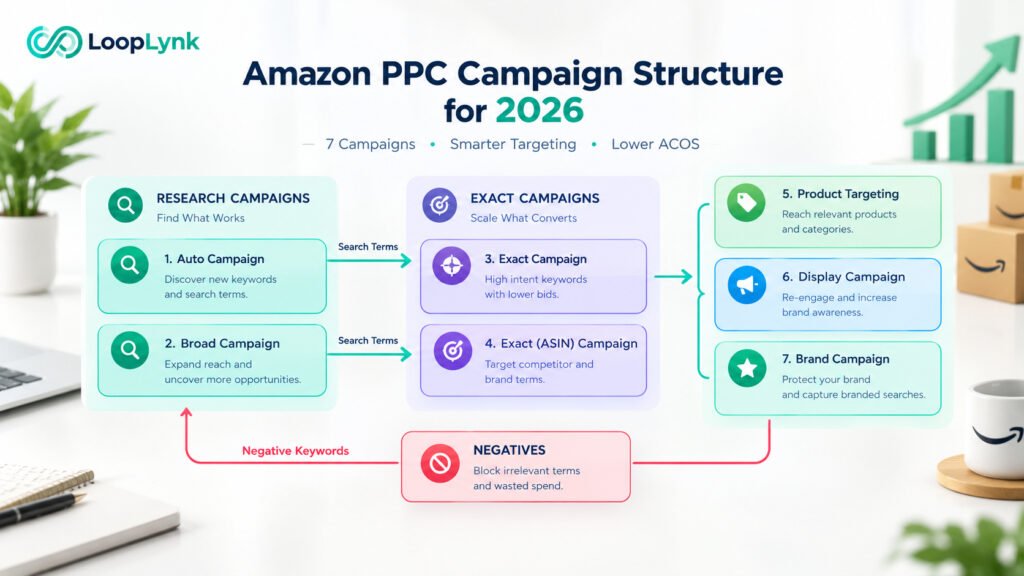
The LoopLynk 2026 structure: seven campaigns per product
We will use the water bottle from above for every example. Price $24.99. Profit before ads $9.00. Break even ACOS 36%. Target ACOS 25%. Total daily budget $60.
| # | Campaign | Job | Targeting | Bidding | Budget share | Target ACOS |
|---|---|---|---|---|---|---|
| 1 | Auto Discovery | Find new search terms and ASINs | Sponsored Products automatic, four targeting groups with separate bids | Dynamic, down only | 15% ($9) | Under 36% |
| 2 | Broad Research | Test 10 to 20 seed keywords | Sponsored Products manual, broad match | Dynamic, down only | 15% ($9) | Under 36% |
| 3 | Phrase Bridge (optional) | Collect data on terms that convert in broad | Sponsored Products manual, phrase match | Dynamic, down only | 10% ($6) | Under 30% |
| 4 | Exact Performance | Make profit on proven terms | Sponsored Products manual, exact match | Fixed, or up and down | 30% ($18) | Under 25% |
| 5 | Product Targeting Attack | Take sales from weaker competitor listings | Sponsored Products, ASIN and category targeting | Dynamic, down only | 15% ($9) | Under 36% |
| 6 | Brand Defense | Protect your own listings and brand name | Own ASINs plus brand keywords in exact match | Dynamic, down only | 5% ($3) | Under 10% |
| 7 | Sponsored Brands and Sponsored Display | Build brand visibility and bring shoppers back | Video ads on top keywords, Store collection, view retargeting | Dynamic, down only | 10% ($6) | Under 30% |
Now each campaign in plain words.
1. Auto Discovery
Amazon picks the search terms and product pages for you. The important part is to split the four targeting groups (close match, loose match, substitutes, complements) and give each one its own bid. Close match usually converts best, so it gets the highest bid. Complements usually converts worst, so it gets the lowest. If they all share one bid you are overpaying for the weak groups.
Example bids for the bottle: close match $0.90, loose match $0.65, substitutes $0.70, complements $0.45.
This campaign never gets switched off. It is your research engine. Its only real KPI is how many profitable search terms it finds each week.
2. Broad Research
Pick 10 to 20 seed keywords that describe the product: insulated water bottle, stainless steel water bottle, 32 oz water bottle, water bottle for gym, and so on. Broad match in 2026 is wider than it used to be. Amazon will show your ad for related terms and close variations, so this campaign needs negatives added every week or it drifts.
Start bids around 60 to 70% of Amazon’s suggested bid. This campaign is for learning, not for profit, so keep the budget capped.
3. Phrase Bridge (optional)
Some sellers move terms straight from broad to exact. We use a phrase campaign as a middle step when a term is converting in broad but does not yet have enough orders to trust in exact. Small accounts with a tight budget can skip this campaign without much loss.
4. Exact Performance
This is where the money is made. Only proven search terms go here. Our rule is simple: two or more orders and ACOS under target in the last 30 days. Each term gets its own bid, set about 10 to 15% above the average cost per click it had in the research campaign.
Because these terms are proven, this is the only place we use fixed bids or dynamic bids up and down, and the only place we add a top of search placement modifier (more on that below).
For the bottle, Exact Performance might start with 12 to 20 terms and grow to 40 or 50 over three months.
5. Product Targeting Attack
Target competitor ASINs that have a higher price, a lower star rating, or fewer reviews than you. Your ad appears on their product page, and a shopper who compares the two picks the better deal. Also use category targeting with refinements, for example the water bottle category, price above $27, rating below 4.2 stars.
The Auto Discovery campaign will feed you new ASINs every week through the substitutes group. Promote the ones that convert.
6. Brand Defense
Target your own ASINs and your brand name in exact match. Bids can be low because the traffic is already yours, but if you leave this space empty a competitor will happily fill it. Target ACOS here is very low, usually under 10%.
7. Sponsored Brands and Sponsored Display
These need Brand Registry. Run a Sponsored Brands video ad on your five best exact keywords. Video ads on the search results page often have a lower cost per click than the Sponsored Products ads right next to them, because fewer sellers bother to make a video. Add a Sponsored Brands product collection ad that sends shoppers to your Store. A clean Amazon storefront design matters here because a weak Store page wastes that click.
Add one Sponsored Display campaign that retargets shoppers who viewed your listing in the last 30 days but did not buy. Keep it small until you see the ACOS.
If you are not Brand Registered yet, put that 10% into Exact Performance instead.
The naming system
Format: AdType_Product_Targeting_Job_Market
- SP_Bottle32_Auto_Discovery_US
- SP_Bottle32_Broad_Research_US
- SP_Bottle32_Exact_Perf_US
- SP_Bottle32_PT_Attack_US
- SP_Bottle32_Exact_Defense_US
- SB_Bottle32_Video_TopKW_US
- SD_Bottle32_Views30_Retarget_US
Name ad groups after the targeting inside them (for example Exact_Core, Exact_LongTail, PT_Competitors, PT_Category). Put every campaign for one product into a portfolio with the product name. When a new team member opens the account they understand it in two minutes. So do you at 11 pm on Black Friday.
The weekly loop: harvest, promote, negate
Structure only works if you run this routine every 7 days (every 14 days for products with very few clicks).
Step 1. Download the search term report for the Auto, Broad and Phrase campaigns. Last 30 days.
Step 2. Promote the winners. Any search term with two or more orders and ACOS under your target goes into Exact Performance as a new exact match keyword. Set the bid 10 to 15% above its average cost per click.
Step 3. Negate the same term where it came from. Add the promoted term as a negative exact keyword in the Auto, Broad or Phrase campaign that found it. Now only the exact campaign bids on that term. No more paying twice for the same shopper.
Step 4. Cut the waste. Any search term that has spent more than your profit per unit ($9.00 for the bottle) with zero orders becomes a negative exact keyword. Any term that is clearly the wrong product (glass bottle, baby bottle, bottle brush) becomes a negative phrase keyword so the whole theme is blocked.
Step 5. Adjust bids in Exact Performance. If a keyword has been above target ACOS for two weeks in a row, lower the bid by 10 to 15%. If a keyword is well under target and your impression share is low, raise the bid by 10%. Small moves, every week, beat big moves once a month.
Write down what you changed. A simple sheet with the date, the campaign, the change and the reason will save you hours later.
Bidding, placements and one new setting to check in 2026
Bidding strategy. Down only for every research and attack campaign. Fixed bids or up and down only in Exact Performance, and only on keywords with a stable history.
Placement modifiers. Amazon lets you raise bids by up to 900% for top of search, rest of search and product pages. Do not go anywhere near that. For proven exact keywords, a top of search modifier of 30 to 50% is usually enough. Check the placement report first. If product page placements show a bad ACOS for you, do not add a modifier there at all.
Off Amazon placements. This is new for 2026. Sponsored Products ads can now show outside Amazon on publisher sites and apps, and since August 10, 2026 inside Amazon Influencer creator content. Existing campaigns were enrolled by default at their current bids and budgets, and top of search and product page modifiers do not apply to those off Amazon placements, as reported by Novadata. Open each campaign and check the setting. The default is Increase reach. If your placement report shows off Amazon traffic with an ACOS far above target, switch that campaign to Limit off Amazon spend. In our audits this single check has saved sellers 5 to 10% of their monthly spend.
Dayparting. Only after you have at least four weeks of hourly data. Turning ads off at night because it feels right is guessing, not optimizing.
Six mistakes we find in almost every audit
- Many products in one campaign. The best product eats the budget and the others never get data.
- The same keyword live in auto, broad and exact with no negatives. You bid against yourself three times.
- Auto campaigns that have never been harvested. We have seen auto campaigns running for eight months with no search term ever promoted.
- A target ACOS picked without knowing break even ACOS. Sellers chase 15% ACOS on a product where 15% means no scale, or accept 40% on a product where 40% is a loss.
- Campaigns switched off after three days. Amazon needs time to place your ads. Give a new campaign at least two weeks and about 10 clicks per keyword before you judge it.
- Blaming PPC for a listing problem. If people click and do not buy, the ad did its job and the listing did not.
Structure cannot fix a weak listing
Before you scale any of the campaigns above, check three things.
If your click through rate is low, your main image is the problem. Our Amazon listing images service exists because the main image decides whether the click happens at all.
If you get clicks but few orders, look at your price, your reviews and your copy. Start with our guide on how to write better Amazon bullet points and, if the whole listing needs work, our Amazon listing optimization page explains what a full rebuild includes.
If your conversion rate is healthy and your ACOS is still high, then it really is a PPC problem, and the structure in this guide will fix it.
Timing for Q4 2026
Build this structure now. You do not have four weeks of data before Prime Big Deal Days on October 6, but you do have almost eight weeks before Black Friday. Run the weekly loop from today and Exact Performance will have three to four weeks of clean data by early November. You will know exactly which 20 to 30 keywords deserve more budget, and you will raise budgets on the performance campaigns first and the research campaigns last.
For Prime Big Deal Days itself, keep it simple. Raise the daily budget on Exact Performance and Brand Defense by 30 to 50% for the two days, leave the research campaigns alone, and bring the budgets back down on October 8. Shoppers keep browsing for a few days after the event, so do not cut bids on the morning after.
Set budget rules or at least a daily check during the big days. A performance campaign that runs out of budget at 2 pm on Black Friday is the most expensive mistake in Amazon advertising, because the sales you lose go straight to the competitor ranked next to you.
Want us to check your structure?
Our team runs this exact system across the accounts we manage. If you want a second pair of eyes on your campaigns before Q4, request a free PPC audit. We will send back a short report showing where the wasted spend is and what we would change first. If you would rather hand the whole thing over, our Amazon account management plans cover PPC, listings and account health together.
Frequently asked questions
How many campaigns should one product have?
For most products, five to seven. Auto Discovery, Broad Research, Exact Performance, Product Targeting Attack and Brand Defense are the core five. Add Phrase Bridge if you have the budget, and Sponsored Brands plus Sponsored Display if you are Brand Registered.
Do auto campaigns still make sense in 2026?
Yes. They are still the cheapest way to find new search terms and competitor ASINs. The mistake is leaving them alone. Harvest them every week and add negatives every week.
What is a good ACOS?
There is no single number. A good ACOS is below your break even ACOS with room for profit. For a product with a 36% break even ACOS, a 25% target is healthy. During a launch you may accept a higher ACOS for a few weeks to gain rank, as long as you decided that on purpose.
How often should I optimize?
Once every seven days is the sweet spot for most accounts. Daily changes do not give Amazon time to respond. Monthly changes let waste run for too long.